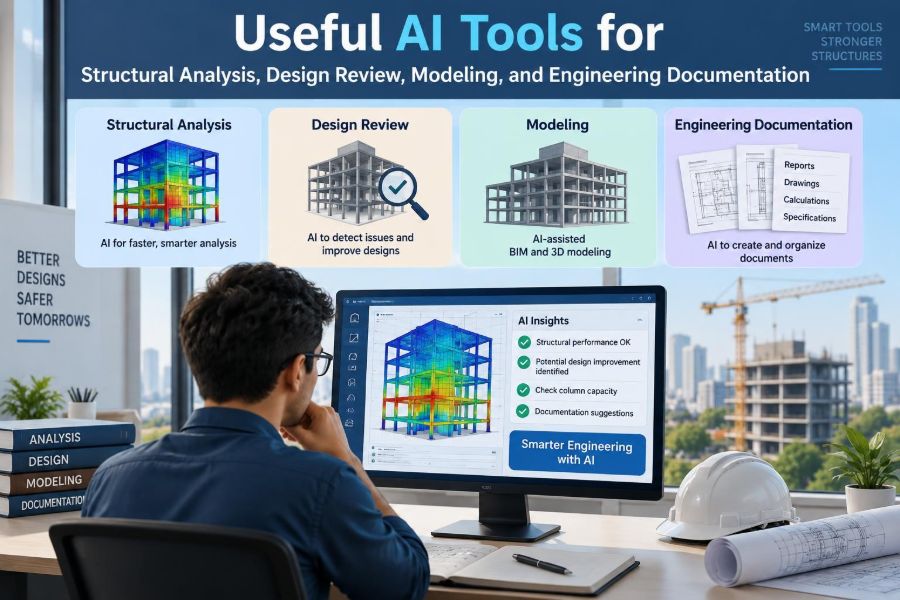

A late design change arrives just before an issue deadline: a transfer beam has moved, several reactions have changed, and the architectural model no longer matches the analysis model. The calculations still need engineering judgment, but much of the surrounding work is repetitive—finding differences, checking inputs, organizing comments, and explaining decisions.
That is where AI tools can be useful. Used well, they can shorten the path from scattered project information to a reviewable engineering task. Used carelessly, they can make a polished-looking error travel faster through a project.
For structural engineers, the productive question is not whether AI can “design a building.” It is which parts of analysis, modeling, review, and documentation can be made more reliable, traceable, and efficient without transferring professional responsibility to a black box.
This guide focuses on practical uses, sensible boundaries, and workflows that let engineers stay firmly in control.
🧭 Start With the Engineer’s Role
AI can generate text, classify information, transform data, and identify patterns. It does not carry legal responsibility for a design, visit site conditions, or understand a project’s full contractual and physical context.
The engineer remains responsible for selecting the structural system, validating inputs, interpreting results, and approving deliverables. Treat AI as an assistant that prepares, checks, or communicates work—not as the engineer of record.
🧠 Separate AI From Analysis Software
A finite-element analysis program solves equations defined by its model, assumptions, and settings. An AI assistant usually predicts useful text or patterns from examples; it is not inherently a mechanics solver.
This distinction matters. A language model may explain load paths clearly while giving an incorrect equation, unit conversion, or code citation. Conversely, an analysis model can produce numerically precise results from an inappropriate idealization. Both require review, but for different reasons.
📥 Use AI to Triage Project Information
Early project folders often contain architectural drawings, geotechnical reports, meeting minutes, specifications, markups, and emails. AI search and document-question tools can help identify references to unusual loads, movement joints, existing conditions, flood requirements, or construction constraints.
Use the output as a navigation aid. Ask it to identify relevant pages and summarize stated requirements, then read the original material before relying on any conclusion.
🔒 Protect Confidential Project Data
Before uploading drawings, models, calculations, or correspondence, understand the organization’s approved tools and data policy. Public services may retain or use submitted content according to their terms, and project material can contain confidential client, security, or personal information.
- Use organization-approved accounts and storage locations.
- Remove unnecessary names, addresses, and commercial information.
- Confirm whether prompts and files are retained or used for training.
- Do not paste credentials, private reports, or unissued designs into unapproved tools.
Data governance is part of competent engineering practice, not an administrative afterthought.
🗂️ Build a Reliable Design Brief
A design brief is often assembled from fragmented instructions. AI can turn extracted requirements into a draft checklist organized by structure, loading, materials, foundations, fire resistance, serviceability, coordination, and deliverables.
The useful output is not a generic summary. It is a list of statements that can be traced back to a source drawing, report, meeting decision, or governing requirement. Add a source column and an “open question” column before treating it as a live project brief.
📐 Clarify the Load Path Before Modeling
AI can help produce a plain-language description of how gravity and lateral loads move through slabs, beams, walls, frames, diaphragms, collectors, foundations, and ground. This is a valuable prompt for early thinking and peer discussion.
Still, a written description does not establish a valid load path. Engineers must check continuity, stiffness, connection behavior, support conditions, construction sequence, and force transfer at discontinuities. A model cannot repair a load path that was never conceived.
🏢 Support Structural System Option Studies
At concept stage, an AI assistant can organize comparisons among steel framing, reinforced concrete, mass timber, precast, braced frames, moment frames, shear walls, or hybrid systems. It can draft questions about spans, floor depth, vibration, fire strategy, embodied impacts, supply chain, and erection constraints.
It should not select a system from a short prompt. Structural choice depends on site, architecture, jurisdiction, contractor capability, material availability, foundations, occupancy, and many project-specific trade-offs.
🧱 Create Better Modeling Checklists
Repeated model setup tasks are ideal for structured checklists. A team can use AI to turn its established procedures into a model-preparation checklist, provided a senior engineer reviews the result against office standards.
- Coordinate grids, levels, member axes, and units.
- Confirm diaphragm assumptions and releases.
- Check material properties, sections, and support idealizations.
- Review load cases, combinations, mass source, and second-order settings.
- Record intentional simplifications and excluded elements.
The value comes from consistency: a checklist makes omissions visible before results look convincing.
🔁 Translate Data Between Tools Carefully
AI-assisted scripts can transform schedules, tabular loads, survey data, member lists, or model exports between formats. This can reduce tedious retyping and make recurring workflows reproducible.
Translation is also a high-risk point. Units, coordinate systems, local axes, naming conventions, blank cells, and duplicated identifiers can change meaning silently. Test scripts on a small known dataset, compare outputs line by line, and retain version-controlled source data.
💻 Use Code Assistance for Small Engineering Utilities
Engineers frequently need small tools: a spreadsheet checker, a file renamer, a load-take-down table, a plot of drift by level, or a parser for analysis output. AI coding assistants can accelerate a first draft and explain unfamiliar programming syntax.
Ask for transparent, modular code with explicit units, comments, input validation, and test cases. Never accept generated code merely because it runs. Independently verify it against hand calculations or deliberately simple examples with known answers.
🧪 Test Scripts With Known Cases
A useful test is a simply supported beam with a uniform load, a cantilever with a point load, or a one-bay frame whose reactions can be checked manually. These cases expose sign errors, conversion mistakes, and incorrect assumptions about end conditions.
For a more realistic utility, include awkward inputs: missing values, zero loads, negative coordinates, nonstandard labels, and mixed units. A script that works only on clean data is not yet a dependable engineering tool.
📊 Summarize Analysis Results, Not Just Maxima
Large models produce more output than anyone can read manually. AI-assisted reporting can organize reactions, deflections, drifts, utilization ratios, modal participation, and member force envelopes into a review summary.
A maximum value alone can be misleading. The engineer should ask where it occurs, which load combination controls, whether the behavior is expected, and whether nearby results are coherent. A high reaction at one support may reflect a real transfer condition—or a duplicated restraint.
🔍 Spot Anomalies for Human Review
Pattern-detection tools can flag outliers such as a column with an unusual axial force, a sudden drift jump, an isolated extreme utilization, or a missing member property. This is useful because errors often appear as a break in an otherwise regular pattern.
An anomaly is a question, not a defect. A transfer level, setback, expansion joint, or intentionally flexible connection may be entirely appropriate. Configure tools to explain why an item was flagged and send the engineer to the governing model view.
🧮 Keep Hand Checks in the Workflow
Simple independent calculations remain among the strongest defenses against model error. Approximate tributary loading, reaction totals, member moments, deflection scale, and lateral force distribution can reveal implausible results quickly.
Hand checks do not need to reproduce every nonlinear detail. Their purpose is to establish order of magnitude and physical sense. If a model says a deep transfer girder carries far less load than its tributary area suggests, investigate before refining the report.
⚖️ Treat Design Codes as Controlled Sources
AI can explain common engineering concepts, but code provisions must be checked in the applicable, current, adopted source and project amendments. Language models can confuse editions, jurisdictions, exceptions, and related standards.
Use AI to generate a research plan or a list of terms to search. Then verify the exact clause, scope, definitions, conditions, and references in the controlled code documents used by the project.
📝 Draft Calculation Narratives Faster
Calculation packages are easier to review when they explain the structural concept, model boundaries, design assumptions, load paths, and conclusions. AI can create a first draft from engineer-provided facts and an established office template.
The engineer should edit it until the narrative reflects the actual project. Remove vague phrases such as “adequate” unless the calculation or check that supports the statement is clearly identified.
📚 Turn Notes Into Reviewable Documentation
Meeting notes, redlines, and calculation comments often contain useful decisions that disappear into email chains. AI can help convert these into action logs with a responsible person, due date, affected document, and required evidence for closure.
Do not let an automated summary become the official decision without review. Ambiguous statements—especially those involving scope, cost, safety, or design changes—need confirmation by the people who made them.
🖊️ Improve Drawing Review Comments
AI is well suited to editing review comments for clarity and consistency. It can turn “check this” into a more useful request: identify the location, describe the concern, state the expected coordination, and ask for a response.
Good comments remain specific. “Confirm framing supports façade load at Grid C/4 and show connection load path” is more actionable than “coordinate structure.” The tool improves wording; the reviewer supplies engineering judgment.
🔄 Compare Revisions With Context
Drawing and model comparison tools can identify changed geometry, labels, dimensions, and sheets. AI can help categorize the changes by likely structural relevance: grid movement, column relocation, level adjustment, opening revision, new equipment, or altered wall type.
Comparison does not determine impact by itself. A small opening shift may be critical at a transfer slab, while a large notation change may have no structural consequence. Reviewers need both the visual difference and the surrounding load-path context.
🤝 Make Peer Review More Systematic
Peer review benefits from a structured prompt list rather than a search for isolated errors. AI can generate a project-specific review agenda from the system description, then the reviewer applies independent judgment.
Useful peer-review themes
- Does the proposed system have a continuous gravity and lateral load path?
- Are model restraints, diaphragms, releases, and stiffness assumptions defensible?
- Do reactions, deformations, and force patterns make physical sense?
- Are foundation assumptions coordinated with geotechnical information?
- Are unusual details identified clearly in the drawings and calculations?
The reviewer should not be limited to the AI-generated list; unexpected project risks often sit outside templates.
🏗️ Connect Office Work to Construction Reality
AI can summarize requests for information, submittal logs, inspection notes, and field reports to identify recurring themes. It may reveal that connection questions, embed conflicts, temporary stability issues, or missing dimensions are consuming time.
These patterns should prompt engineering action: clarify details, revise sequencing notes, hold a coordination meeting, or ask for a targeted site observation. A summary is useful only when it leads to an accountable response.
🚧 Respect Construction Sequence
Many structures behave differently during erection than in their completed state. Shores, partially installed bracing, uncured concrete, temporary openings, staged loading, and equipment access can govern a temporary condition.
Generic AI advice is especially weak here because sequence depends on the contractor’s means and methods and the actual site plan. Identify temporary works responsibilities clearly and seek qualified review where the permanent design interacts with temporary stability.
🌍 Use AI for Sustainability Questions With Care
AI can help organize material quantities, identify information needed for an environmental assessment, and draft comparisons of alternatives. It can also help engineers ask better questions about reuse, span efficiency, material substitution, and demolition constraints.
It cannot reliably infer project-specific carbon impacts from generic descriptions. Environmental declarations, supplier information, transport assumptions, waste factors, and assessment methodology all affect comparisons. Use controlled project data when claims will inform decisions.
🎓 Build Team Knowledge Without Copying Errors
A searchable internal library of approved calculation examples, typical details, lessons learned, and review checklists can be powerful. AI retrieval tools can help colleagues find relevant prior work without relying on memory alone.
Curate the source material. Old details may reflect superseded standards, different materials, or conditions that do not apply. Label documents by status and discipline review, and teach users to trace every reused solution back to its original assumptions.
🧾 Preserve Traceability and Version Control
If AI influences a calculation narrative, script, review log, or requirement register, the project team should still be able to explain what was used and why. Save source files, model versions, inputs, verification records, and issued outputs in the normal project system.
For consequential automation, record the tool version, prompt purpose, reviewer, date, and test evidence. The goal is not bureaucratic perfection; it is making later checking possible when a question arises months later.
⚠️ Recognize Hallucinations and False Confidence
AI can state incorrect information in a fluent and authoritative tone. In engineering, that may take the form of invented references, plausible but wrong equations, incomplete exceptions, or a confident interpretation of an unclear drawing.
Warning signs include missing assumptions, unexplained numerical precision, citations that cannot be located, and advice that sounds universal despite a project-specific question. Ask the tool to state uncertainty and assumptions, then verify independently.
🛑 Avoid Automating High-Consequence Decisions
Do not delegate final member sizing, code compliance conclusions, sealed calculations, safety-critical design decisions, or acceptance of construction work to an unverified AI workflow. The consequences of an error are too significant, and the required context is too broad.
Automation can support these activities by organizing evidence and highlighting questions. It should not replace accountable analysis, review, or professional sign-off.
🧰 Choose Tools by Task, Not Hype
| Task | Useful tool capability | Essential control |
|---|---|---|
| Document search | Extraction and retrieval | Read the source document |
| Model data processing | Scripting and transformation | Test against known cases |
| Result review | Trend and outlier detection | Interpret physical behavior |
| Reporting | Drafting and formatting | Engineer edits and approves |
| Code research | Question framing | Verify controlled code text |
The best tool is often the least complicated one that solves a defined problem with a clear verification route.
🧭 Start With a Small, Measurable Pilot
Choose one recurring, low-consequence task: extracting actions from meeting minutes, checking naming conventions in a model export, or drafting a calculation assumptions page. Define what good output looks like, who reviews it, and how errors will be recorded.
Measure whether the workflow saves time without increasing rework. A pilot that exposes limitations is valuable; it helps the team improve the process before applying it to more demanding work.
✅ A Practical Daily Workflow
- Define the engineering question and identify the controlled source information.
- Use AI to organize, draft, search, or transform—not to make the final judgment.
- Check assumptions, units, missing information, and unusual outputs.
- Verify important results with independent calculations, source documents, or peer review.
- Record decisions and retain the evidence needed to reproduce the work.
This sequence keeps the technology in a useful supporting role while preserving the habits that make structural work dependable.
🏁 The Core Principle: Accelerate Work, Not Accountability
AI is most valuable when it reduces friction around engineering: locating information, handling repetitive data, producing first drafts, exposing patterns, and making review more systematic. Those gains can create more time for the work that needs engineering attention.
It becomes risky when fluency is mistaken for understanding or when automation hides assumptions. Good structural engineering still depends on mechanics, evidence, coordination, constructability, and independent checking.
Use AI to make engineers more deliberate and better informed—not to make critical decisions less visible.
The strongest AI workflow is one that improves speed while making engineering judgment, verification, and responsibility easier to see. That is a practical standard for adopting useful tools without compromising the discipline that safe structures require. 🏗️🔍✅